Projects
Simulated enterprise user onboarding by provisioning four Entra ID accounts across three security groups, assigning built-in roles at resource group scope using the principle of least privilege, and creating a custom role definition for a Storage Blob Reader Plus permission set that didn't exist in the built-in catalog. Verified the assignments by signing in as each test user and confirming the access boundaries held. Enabled MFA on all accounts and reviewed Entra ID sign-in audit logs.
| Group | Role | Scope |
|---|---|---|
| grp-developers | Contributor | RG |
| grp-ops | VM Contributor | RG |
| grp-readonly | Reader | RG |
| dev1 | Storage Blob Reader Plus (custom) | RG |
- Groups, not individual users — Role assignments are on security groups, not
individual accounts. Adding a new developer means adding them to
grp-developers— no new role assignments required. This is the correct enterprise pattern: manage group membership, not role assignments, as the team evolves. - Resource group scope, not subscription — Assignments scoped to
rg-phase1-labonly. Scoping to subscription would givegrp-developersContributor access to every resource in the subscription — a significant blast radius for a lab. Narrowest scope that satisfies the requirement. - Custom role for gaps in built-in catalog — No built-in role provided exactly Storage Blob read access without additional permissions. Rather than assigning a broader role than necessary, a custom role was created with exactly the required action. This is the least-privilege approach applied at the permission level.
- Test every assignment before declaring done — Signed in as each test user in a private browser session and verified access boundaries. A role assignment that hasn't been tested is an assumption, not a control.
An organization with 200 Azure resources and 50 engineers can't maintain individual role assignments — the combination count grows faster than anyone can manage. Group-based RBAC means access is controlled in one place (group membership) and role assignments are stable infrastructure. New hire: add to group. Offboarding: remove from group. All access changes flow from that one action.
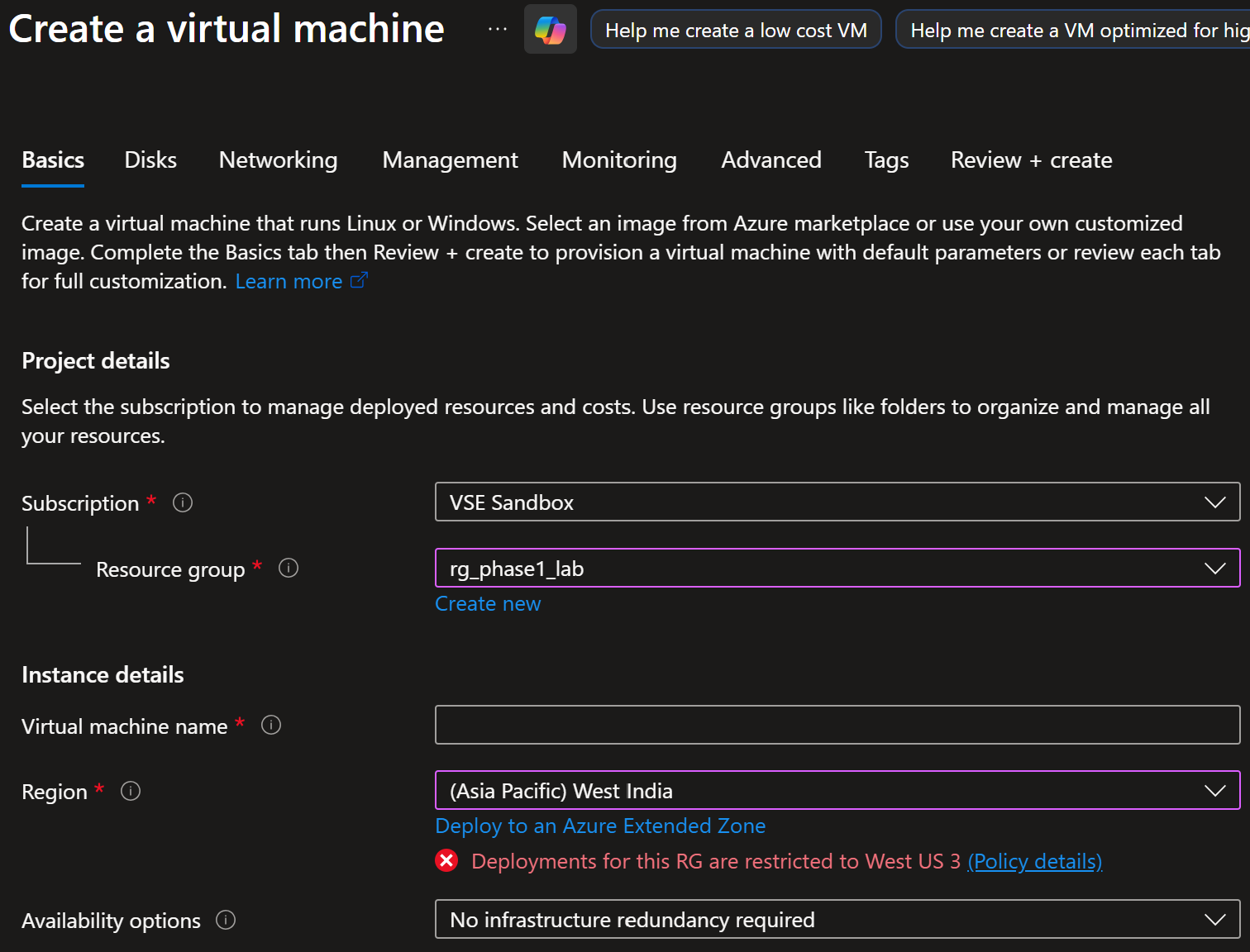
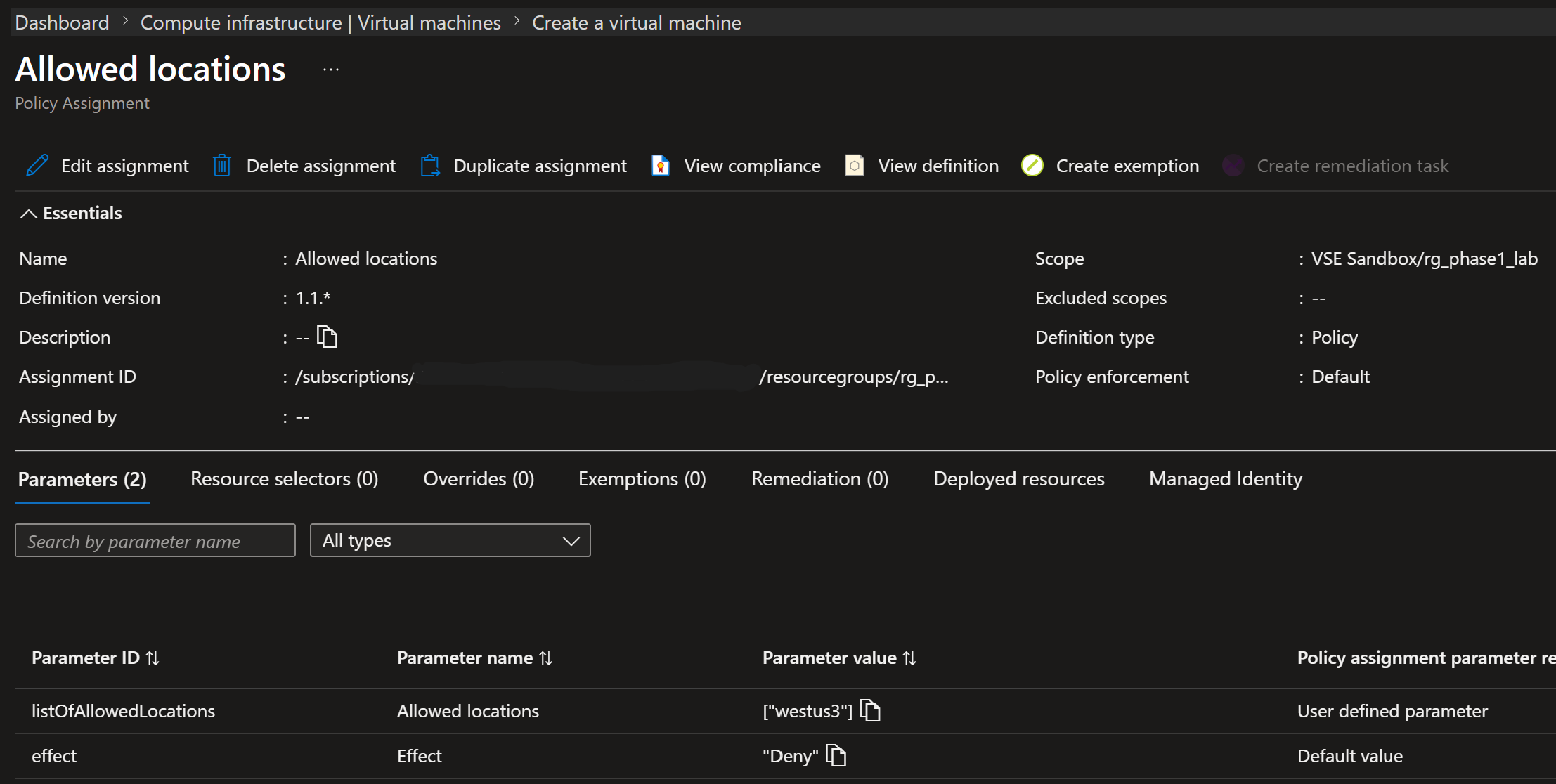
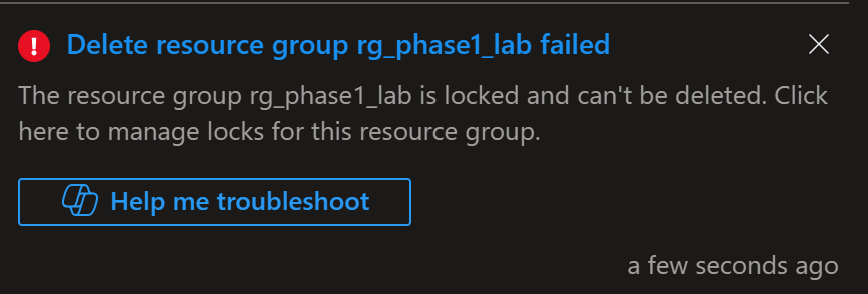
Built a governance baseline using Azure Policy — three policies bundled into an initiative, deployed with Deny effect to prevent out-of-region resources and enforce required tags, and Audit effect for non-destructive compliance reporting. Verified the controls by deliberately triggering the location policy denial and the resource lock block, capturing both as evidence. Configured budget alerts at 80% actual and 100% forecast to prevent cost overruns. The governance pattern established here was extended in Phase 4: the lab resource group carried 10 active policy assignments throughout all subsequent projects.
| Assignment | Effect |
|---|---|
| require-tag-env | Deny |
| require-tag-owner | Deny |
| allowed-locations-wus3 | Deny |
| appsvc-https-only | Deny |
| appsvc-managed-identity | Deny |
| appsvc-no-remote-debug | Deny |
| inherit-tag-env | Inherit |
| inherit-tag-owner | Inherit |
| inherit-tag-project | Inherit |
| inherit-tag-phase | Inherit |
- Audit before Deny for new policies — The managed-disk audit policy was intentionally set to Audit rather than Deny. Switching an existing environment to Deny without first understanding the compliance state causes unexpected deployment failures. Audit → review → Deny is the production-safe rollout sequence.
- Initiatives over standalone assignments — Even with three policies, bundling into an initiative made compliance reporting cleaner and assignment to new scopes a single action. Always start with an initiative — standalone assignments don't scale beyond a handful of policies.
- Tag inheritance via policy, not manual tagging — Tags on the resource group
propagate automatically to all resources via
inherit-tag-*policy assignments. Manual tagging is inconsistent and breaks. Policy-enforced inheritance is the only reliable approach at scale. - Policy definition IDs — look them up, then pin them — Built-in definition IDs are
stable: a definition keeps the same ID across versions, while its display name and other strings can
change in a patch release (Microsoft Learn). So find the ID once by display name with
az policy definition list --query "[?displayName=='Allowed locations'].name" -o tsv, then use the ID, never the name, in code. One character difference caused significant debugging time. - Forecast alert over actual spend alert — A 100% actual spend alert tells you money has already been spent. A 100% forecast alert fires before you hit the limit and leaves time to react. In production the forecast alert is the one that matters.
{
  "name": "initiative-baseline-governance",
  "properties": {
    "displayName": "Baseline Governance Initiative",
    "description": "Location, tagging, and disk compliance",
    "policyDefinitions": [
      {
        "policyDefinitionId": "/providers/Microsoft.Authorization/
  policyDefinitions/e56962a6-4747-49cd-b67b-bf8b01975c4f",
        "parameters": {
          "listOfAllowedLocations": {
            "value": ["westus3"]
          }
        }
      },
      {
        "policyDefinitionId": "/providers/Microsoft.Authorization/
  policyDefinitions/96670d01-0a4d-4649-9c89-2d3abc0a5025",
        "parameters": {
          "tagName": { "value": "environment" }
        }
      },
      {
        "policyDefinitionId": "/providers/Microsoft.Authorization/
  policyDefinitions/06a78e20-9358-41c9-923c-fb736d382a4d"
      }
    ]
  }
}
Remediation tasks fail immediately after policy assignment because the managed identity needs 30–60
seconds to propagate through Entra ID. Wait 60 seconds and use unique names for retry attempts.
Fallback: az resource tag --is-incremental for immediate tagging without waiting on
remediation.
Not an AZ-104 lab: this is the identity layer of Phase 2 of the AI-103 build, the Intelligent Insights Platform (IIP). An upload triggers an Azure Function that runs an AI agent, and the result appears on a web page behind Entra ID sign-in. Nothing in it uses a password, an account key or a client secret. Every identity has a written job, and every role is a row in a written RBAC model (18 rows) that was tested rather than assumed.
| Identity | Job | Access |
|---|---|---|
| id-iip-dev-wus-01 | The Function's runtime identity | The upload queues (one custom role), its storage, Foundry, telemetry |
| id-iip-dev-wus-02 | GitHub Actions deploys, over OIDC | Website Contributor on the Function only; trusts branch main only |
| id-iip-dev-wus-03 | The results page's sign-in | A federated credential on the app registration, in place of a client secret; no Azure roles |
| Event Grid system topic | Turns uploads into queue messages | Queue Data Message Sender, at account scope (see Key Design Decisions) |
Every script and the Function sign in with Entra ID, with 12 call sites moved off keys. But the Function's Foundry role still includes the permission to list the account keys, and a Visual Studio Code was found fetching them, in pairs, every 14 minutes 42 seconds. The step that makes a fetched key useless is turning key authentication off on the account. That's logged as the next step, not claimed as done.
- A custom role, because the documented minimum failed. With Microsoft's documented roles for a queue trigger, failed uploads retried after 10 minutes instead of 1. The stack trace showed a 403 on Update Message, which needs a permission neither role has. A custom role holding just what the trigger needs fixed it, instead of the broader built-in Contributor, and a test with and without it proved it.
- Scope is where the service checks. Creating the Event Grid event subscription (the rule that sends upload events to the queue) failed three times, with the correct role on the right queue. Event Grid checks the identity against the storage account when it creates that rule, so the grant moved to the account, and the trade-off is written down.
- Group-gated, tested with a non-admin. Only members of one security group can sign in to the results app. Global Administrators bypass "assignment required", so the gate was tested with an ordinary test user.
- Conditional Access, under a 30-day Entra ID P2 trial. One app policy requires phishing-resistant MFA (an authentication strength) for the results page. Turning off security defaults meant replacing them with four baseline policies, and creating a break-glass Global Admin first, excluded from every policy. Six sign-in tests passed with the policy On, and the policies were exported. They're scheduled to be rolled back, with security defaults restored, before the trial ends.
- Secretless deploys. GitHub Actions signs in over OIDC, so no secret is stored anywhere. Checking the first deploy turned up basic publishing credentials still on by default; they were switched off.