Projects
Built a hub-spoke VNet topology with two networks connected via bidirectional
peering. The hub holds shared services — Bastion, DNS — while each spoke
is an independent blast radius. All VMs deployed with no public IPs;
access via az vm run-command for automation and Bastion for
interactive sessions. NSGs attached at subnet level, not NIC level, so
all future resources in the subnet inherit the same rules automatically.
VNet peering is not a single connection — it requires two separate objects:
Hub→Spoke AND Spoke→Hub. A single-direction peering shows
peeringState: Initiated, not Connected.
Traffic does not flow until both are created, both with
allowForwardedTraffic: true.
Azure SDN handles peered VNet routes at the hypervisor layer. The guest OS routing table will never show peering routes — they will always appear missing even when peering is fully functional. Always test with actual connectivity: ping a real VM IP across the peering, never the subnet gateway.
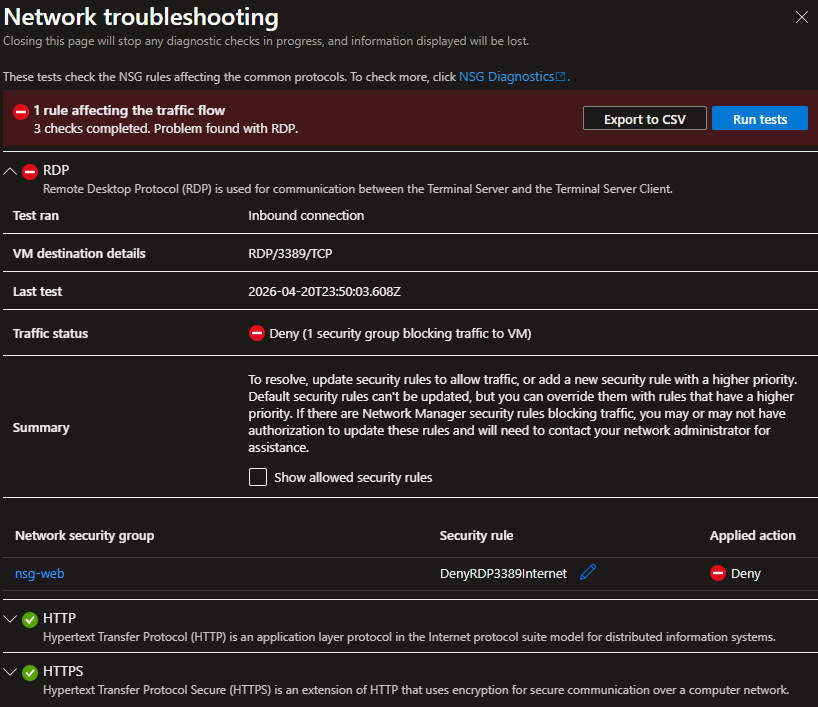
- No public IPs on VMs —
--public-ip-address ""at creation time. Eliminates the attack surface entirely. All access routes through Bastion (interactive) or run-command (automation). - NSG at subnet level, not NIC level —
az network vnet subnet create --nsgattaches the NSG to the subnet. Protects all resources in the subnet including future additions. Single management point vs. per-VM NIC rules. - Service tags over IP ranges —
AzureLoadBalancer,VirtualNetwork,Internetrather than hardcoded IP ranges. Microsoft maintains service tags automatically — hardcoded IPs break when Azure infrastructure changes. - Internet vs * in NSG deny rules —
Internetblocks public traffic only.*blocks everything including Bastion connections through the VNet. Using*to deny RDP/SSH would silently block Bastion.


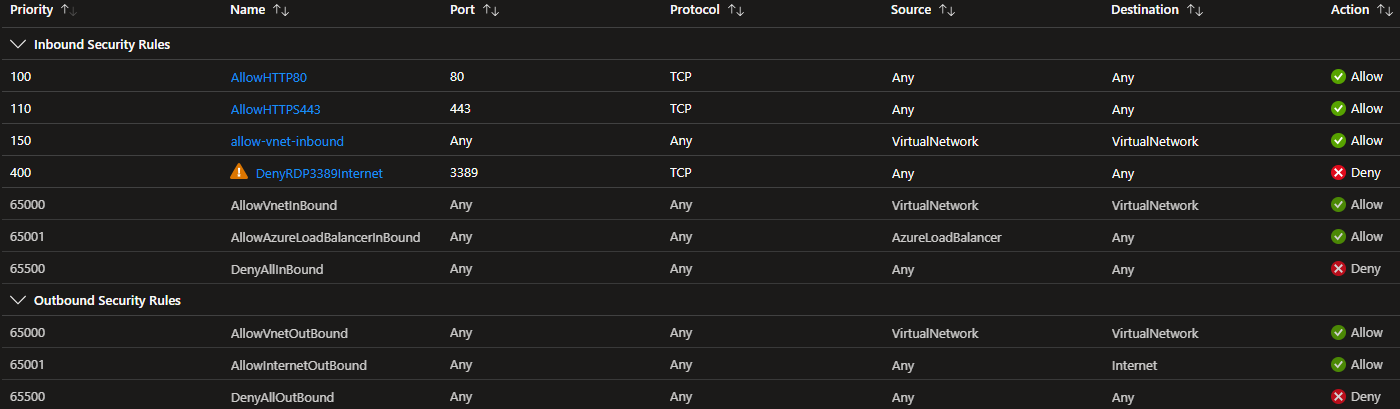
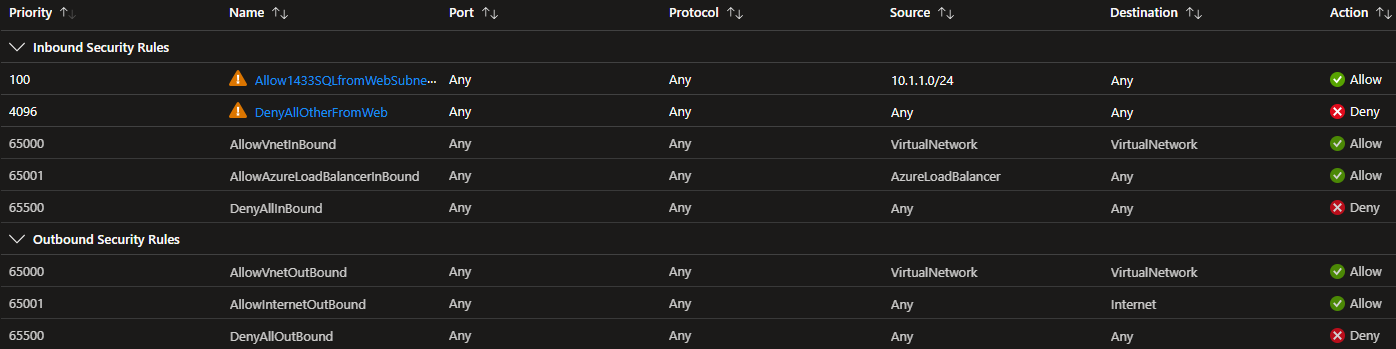
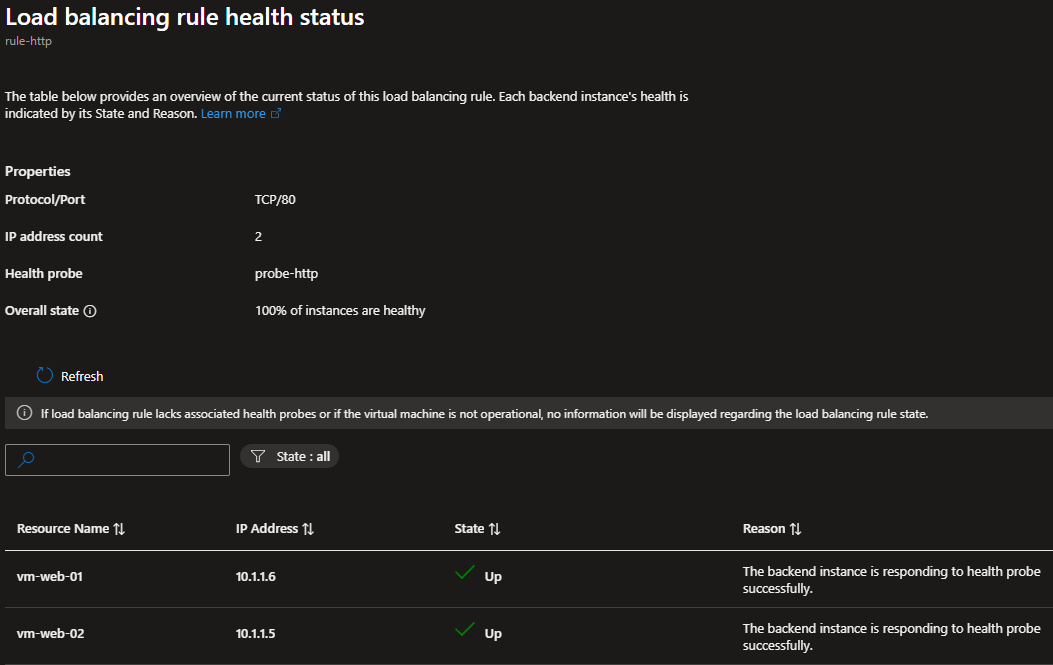
Deployed a Standard SKU Load Balancer distributing HTTP traffic across two Ubuntu VMs running nginx, each in separate fault domains via an availability set. The Standard SKU required explicit configuration of things Basic SKU provided implicitly — health probe NSG rules and outbound SNAT. Four separate issues were encountered and resolved during this project, each genuinely educational.
- Browsers silently upgrade bare IPs to HTTPS — Chrome and Edge default to HTTPS
for
all addresses. The LB only had port 80 configured, so the attempt timed out and looked like an LB
misconfiguration. Always type
http://explicitly when testing HTTP-only backends. - Health probes blocked by NSG — Without a rule allowing the
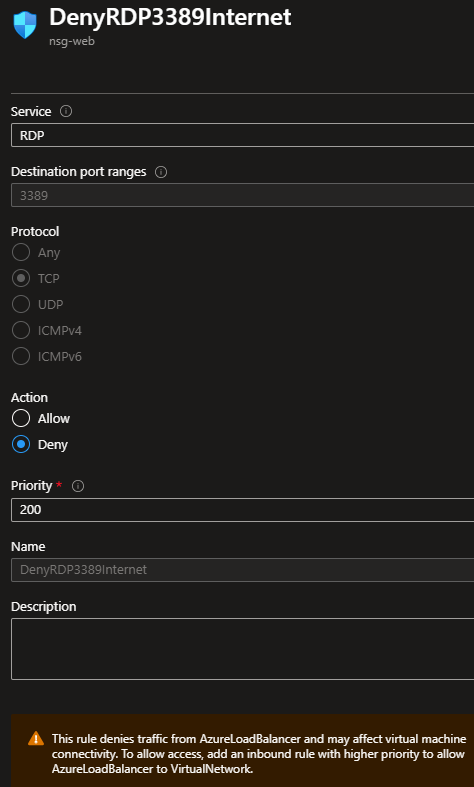
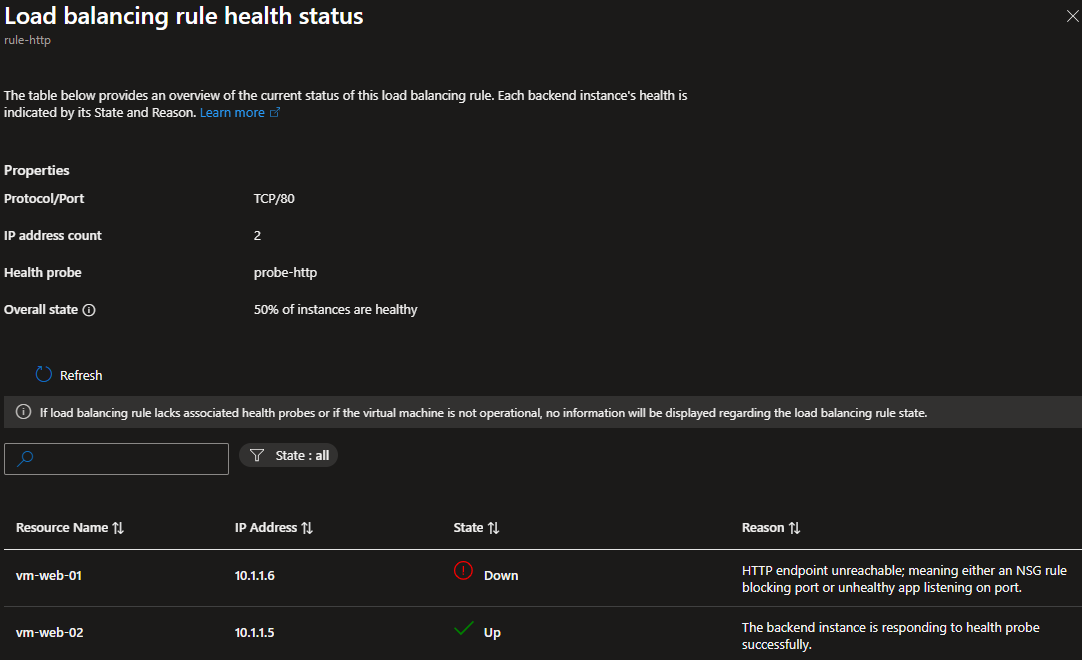
AzureLoadBalancerservice tag on port 80, probes are silently dropped. Both VMs show as Unhealthy and the LB drops all traffic. Basic SKU allowed this implicitly; Standard does not. - No implicit outbound SNAT — VMs in the backend pool with no public IP had zero
internet access.
apt install nginxappeared to succeed but silently failed.systemctl status nginxrevealed the service didn't exist. Fix: second public IP, frontend IP config, outbound rule. - Frontend IP config is an intermediate layer — Outbound rules reference frontend IP configurations, not public IPs directly. The dependency chain is: Public IP → Frontend IP Config → Rule. Portal abstracts this; CLI does not.
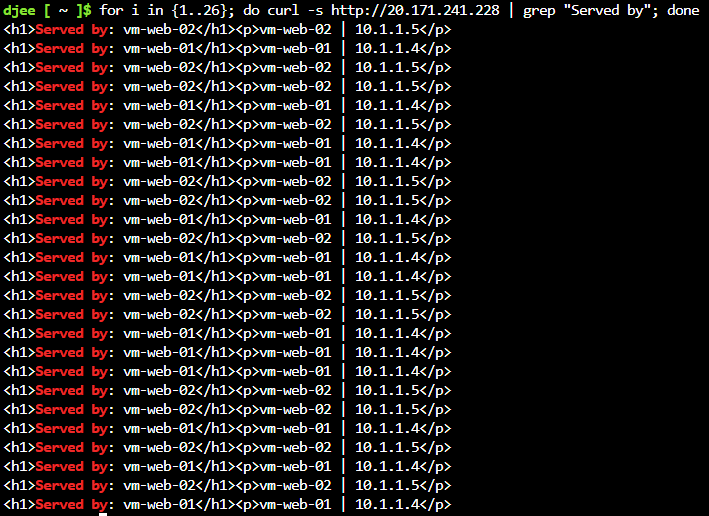
for i in {1..20}; do curl -s http://<LB-IP> | grep "Served by"; done | sort | uniq -c
- Standard SKU — no exceptions — Basic SKU Load Balancer is being retired. Standard is zone-redundant, supports outbound rules and multiple frontend IPs. Every new deployment uses Standard.
- Availability set for fault domain separation — Two VMs in separate fault domains means a single rack failure doesn't take both offline. Minimum viable HA for a two-VM pool.
- Dedicated outbound public IP — Separate from the inbound frontend IP. Keeps outbound SNAT traffic on a distinct IP, simplifying firewall rules and preserving the inbound IP for load-balanced traffic only.
- Round-robin is not strictly alternating — Standard LB uses a 5-tuple hash. Browser HTTP keep-alive reuses TCP connections, so the same VM serves multiple requests in a row. Expect uneven distribution (e.g., 13/7), not exactly 10/10.
Without outbound SNAT, apt install nginx printed connection warnings but reported
success — exit code 0. Never trust package manager exit status alone on a newly provisioned VM.
Always
verify with systemctl status nginx.
Removed Azure Blob Storage from the public internet without changing
application hostname — using a private endpoint and split-horizon DNS.
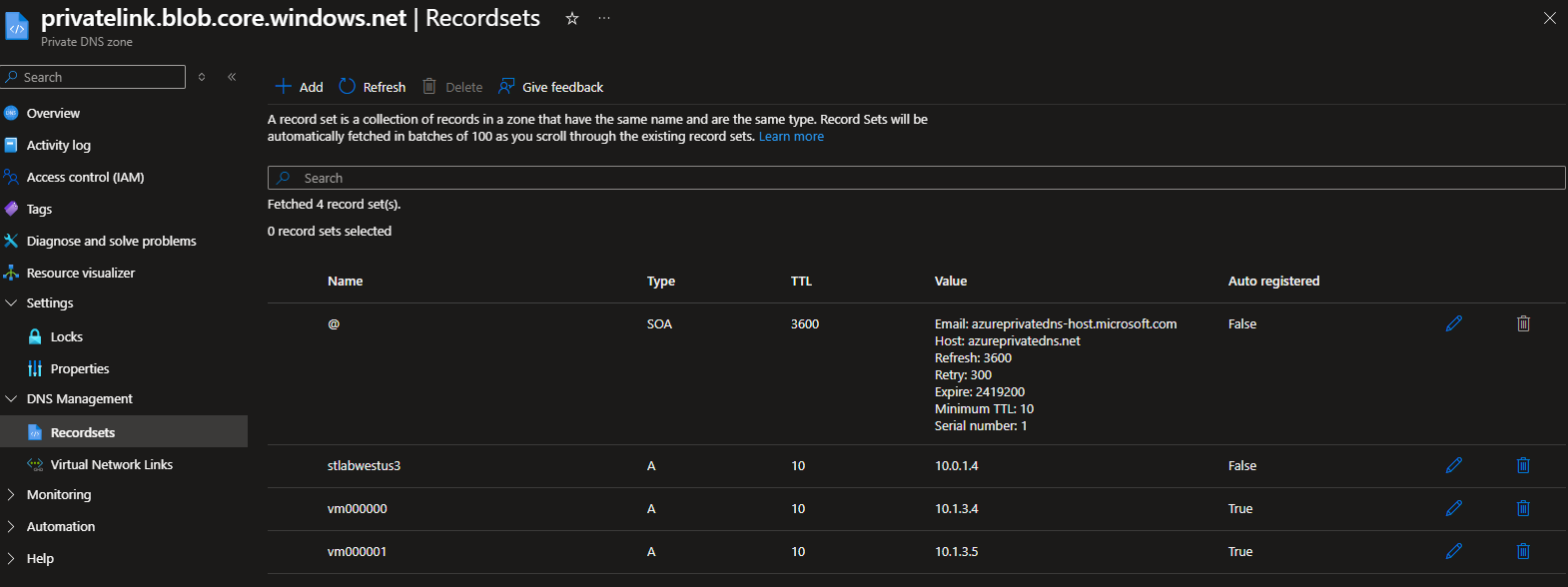
VMs inside the VNet resolve the storage hostname to a private IP
(10.0.1.6) via the private DNS zone. Public internet
clients receive a 404 WebContentNotFound response — not
a 403, by design. Azure Storage does not acknowledge the endpoint
exists when public access is disabled. A 403 would reveal the resource
is there. A 404 reveals nothing.
| Source | Resolves to | Result |
|---|---|---|
| vm-web-01 (vnet-spoke) | 10.0.1.6
|
✓ Private access |
| vm-hub-test (vnet-hub) | 10.0.1.6
|
✓ Private access |
| Public internet | Public IP (overridden) | ✗ 404 — resource not acknowledged |
- Private DNS zone linked to ALL VNets — Linking only to vnet-hub means vnet-spoke VMs query Azure DNS without the private zone override and receive the public IP. DNS resolution and network routing are independent — peering establishes the route; VNet DNS zone links determine which DNS response is returned. Both must be configured.
- Private DNS zone names are fixed — The zone name for each Private Link
service
is
mandated by Azure. Any other name prevents automatic A record creation. Blob Storage must be
privatelink.blob.core.windows.net. - Disable public access only after private connectivity confirmed — Confirm-then-lockdown: deploy endpoint → verify private IP resolution via nslookup → disable public access → verify public is blocked. Re-enable before teardown — CLI delete commands from Cloud Shell cannot reach storage with public access disabled.
- 404 is the stronger security posture — When public network access is disabled, Azure Storage returns 404, not 403. A 403 would reveal the resource exists. A 404 reveals nothing. This is intentional Azure behavior, not a misconfiguration.
Common mistake: creating the private DNS zone with a custom name. Azure requires the exact mandated name per service type or the private endpoint NIC's A record will not be auto-registered. Always verify the zone name matches the Private Link DNS zone table before deployment.

Deployed Azure Application Gateway (Standard_v2) as an L7 load balancer
with WAF policy in front of the web subnet, and Azure Bastion for
secure browser-based VM access with no public IPs required.
Both services have strict subnet requirements — Application Gateway
requires a dedicated subnet with three specific NSG rules or provisioning
fails; Bastion requires a subnet named exactly AzureBastionSubnet
with inline NSG rules.
- GatewayManager → ports 65200–65535 (priority 100) — Control plane traffic from Azure infrastructure. Without this, the gateway fails health checks and will not provision.
- AzureLoadBalancer → any (priority 200) — Azure internal health probing. Required for Standard_v2.
- Internet → ports 80, 443 (priority 300) — Inbound client traffic. Restrict source to known ranges in production.
NSG rules for AzureBastionSubnet must be defined inside
properties.securityRules: [...] on the NSG resource, not as separate child
resources.
Separate child resources deploy in parallel and may not be complete when the compliance
check runs
at
subnet attachment time.
The subnet must be named exactly AzureBastionSubnet — no CAF naming, no
variations.
Minimum size /26. Any deviation and Bastion will not provision regardless of all other
configuration
being correct.
- App Gateway requires a dedicated subnet — Cannot share a subnet with any other resource type. Minimum /27 for lab, /24 for production. This is a hard platform requirement, not a recommendation.
- deployBastionHost condition flag — Bastion Standard SKU costs ~$0.19/hr
(~$140/mo).
A
deployBastionHost boolparameter in Bicep allows the NSG, subnet, and all rules to deploy in place while the host itself is only created when needed. Cost control pattern for lab environments. - Bastion target VM NSG rule required — Bastion can connect to the VM but
the
VM's
NSG must allow inbound SSH (22) or RDP (3389) from the
AzureBastionSubnetrange (10.0.7.0/26). No clear error is surfaced — the connection simply fails silently. - WAF over NSG for L7 protection — NSGs operate at L3/L4 — they can block IPs and ports but cannot inspect HTTP payloads. WAF policy on Application Gateway provides OWASP ruleset enforcement, SQL injection protection, and custom rules at the application layer.