Projects
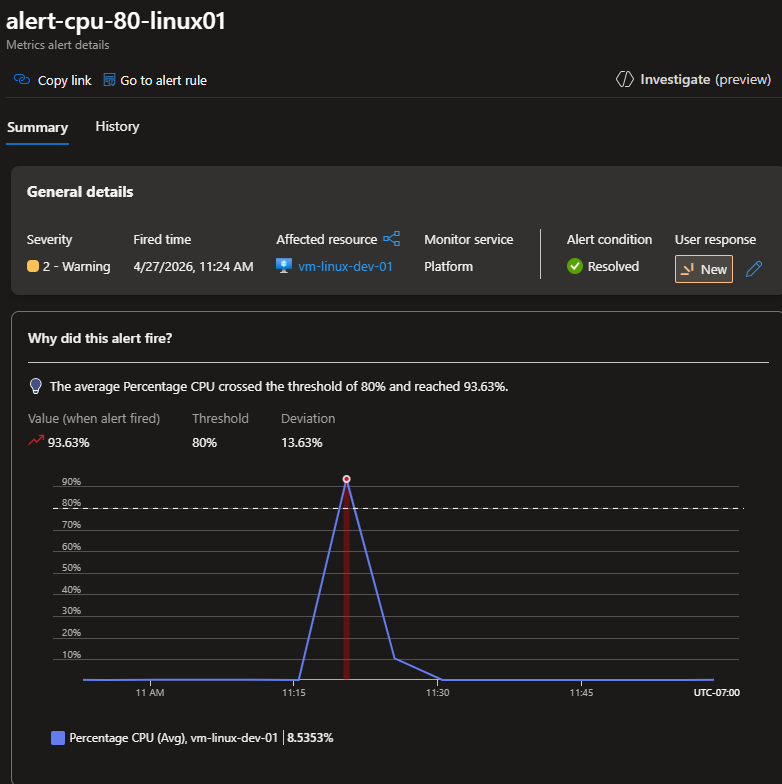
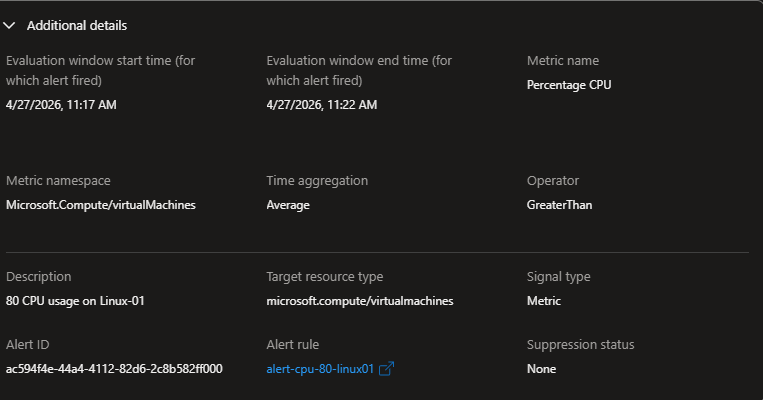
Built the observability layer for the lab environment: a Log Analytics workspace receiving performance and event data from both VMs via Azure Monitor Agent and Data Collection Rules, metric alert rules firing on CPU threshold breaches, a log-based heartbeat alert detecting VM availability, and an Action Group delivering email notifications. Verified end-to-end by stress-testing CPU on the Linux VM and confirming the alert fired and the email arrived.
The legacy Log Analytics agent (MMA) and Azure Diagnostics extension (LAD) were deprecated in March 2026. The current pattern is Azure Monitor Agent with Data Collection Rules. DCRs decouple the definition of what data to collect from the agent — the same DCR can be associated with multiple VMs, and data collection can be changed without touching the agent.
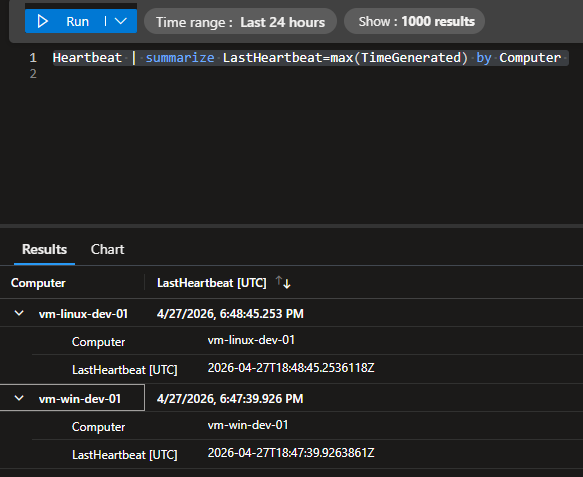
Heartbeat
| summarize LastSeen=max(TimeGenerated) by Computer
| extend MinutesSince=datetime_diff('minute',now(),LastSeen)
| order by MinutesSince asc
Perf
| where CounterName == "% Processor Time"
| where ObjectName == "Processor"
| where InstanceName == "_Total"
| summarize AvgCPU=avg(CounterValue)
    by Computer, bin(TimeGenerated, 5m)
| render timechart
- AMA over legacy agents — MMA and LAD are deprecated. Azure Monitor Agent is the current correct deployment pattern. Remove legacy extensions before installing AMA to avoid conflicts — both agents writing to the same workspace produce duplicate records.
- DCR association has no -g flag —
az monitor data-collection rule association createdoes not accept-g. The resource group is implicit in the--resourceARM ID. Use the full resource ID. - Metric alert vs log alert — Metric alerts evaluate a numeric measurement against a threshold in near-real-time. Log alerts run a KQL query on a schedule. Use metric alerts for threshold breaches on known counters; use log alerts for absence detection (heartbeat missing) or complex multi-resource patterns.
- Action Group is reusable — Defined once, referenced by multiple alert rules. Adding a new notification target means updating the Action Group, not each individual alert rule.
After creating a diagnostic setting, logs take 5–15 minutes to appear in Log Analytics. Trigger a read operation first, wait, then query. Running the KQL query immediately returns zero results and looks like a misconfiguration — it isn't.
Deployed a zero-credential architecture connecting App Service to Key Vault using
system-assigned managed identity. No passwords, no API keys, no service principal secrets anywhere in
code, configuration files, deployment scripts, or git history. The App Service proves its identity to
Microsoft Entra ID, receives a scoped token, and uses that token to resolve Key Vault references at
runtime — surfacing secrets as ordinary environment variables to the application without any Key Vault
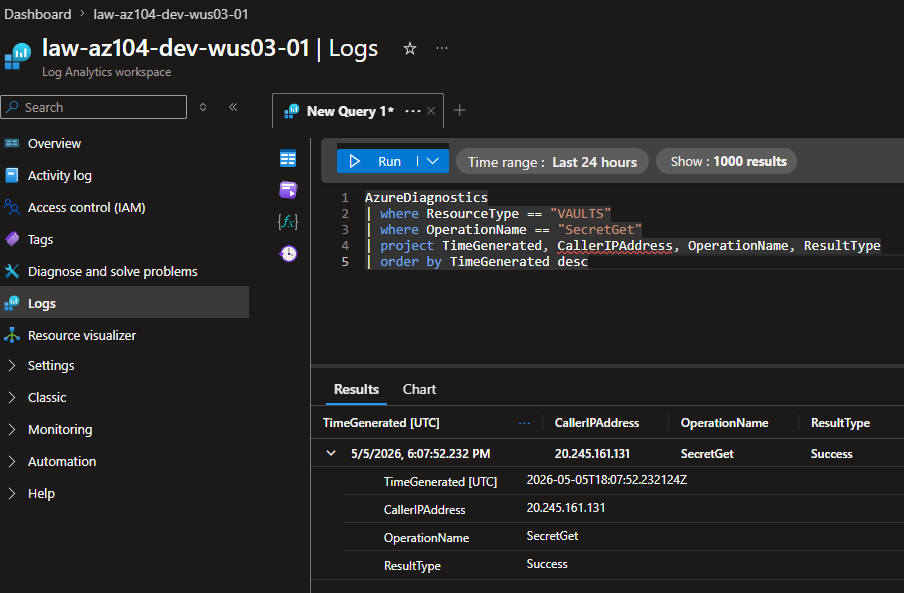
dependency in application code. Every secret access is logged to Log Analytics as an
AuditEvent and queryable via KQL.
The traditional approach stores a credential somewhere the app can read it. Every step is a failure point: committed to git, stored in plaintext, forgotten after rotation. Managed identity eliminates the credential entirely. Azure manages the identity lifecycle — when the App Service is deleted, the identity is deleted with it. Nothing to rotate, nothing to leak, nothing to accidentally expose.
AzureDiagnostics
| where ResourceType == "VAULTS"
| where OperationName == "SecretGet"
| project TimeGenerated, CallerIPAddress,
          OperationName, ResultType
| order by TimeGenerated desc
- RBAC model, never Access Policies — Access Policies grant access at vault level — all or nothing. RBAC grants access at any scope, integrates with standard Azure IAM tooling, and produces an audit trail consistent with every other RBAC operation in the subscription. Access Policies are deprecated for new vaults.
- Key Vault Secrets User — least privilege — The App Service identity has read-only access to secret values only. It cannot list secrets, create, modify, or delete. The application gets exactly what it needs and no more.
- KV references over SDK retrieval — Configuring secrets as App Service references
(
@Microsoft.KeyVault(SecretUri=...)) means the application has no Key Vault dependency in its code. The runtime resolves the reference before surfacing it as an environment variable. Infrastructure manages secrets; application consumes environment variables. - RBAC scope — Key Vault resource, not resource group — Scoping to the resource group grants the same role against every resource in the group. Scope every RBAC assignment as narrowly as possible.
The @ symbol and parentheses in @Microsoft.KeyVault(...) are mishandled by
Git Bash and WSL even inside quotes. All az webapp config appsettings set commands
containing KV references must run from Azure Cloud Shell.
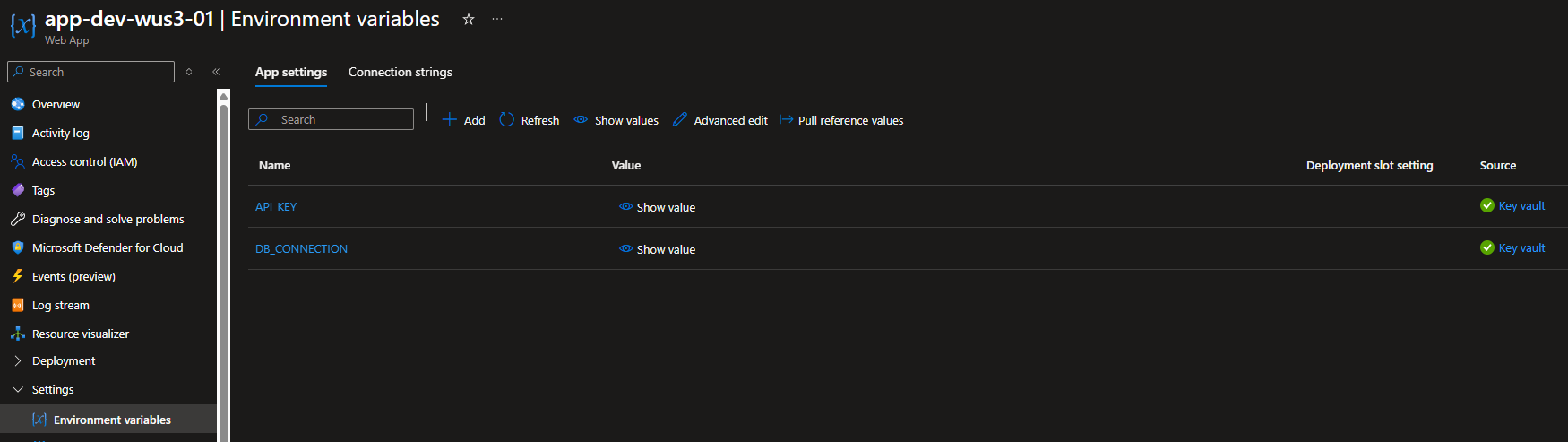
After setting KV references via CLI, output shows "value": null. This is expected — App
Service hides the reference string for security. Verify in the portal under Settings → Environment
variables: correctly resolved references show a green checkmark and "Key vault" in the Source column.